YouGooDai
Mobile of the Day

YouGooDai

5.0 FREE
  • Screenshot 1
  • Screenshot 2
  • Screenshot 3
  • Screenshot 4
  • Screenshot 5
  • Screenshot 6

Description

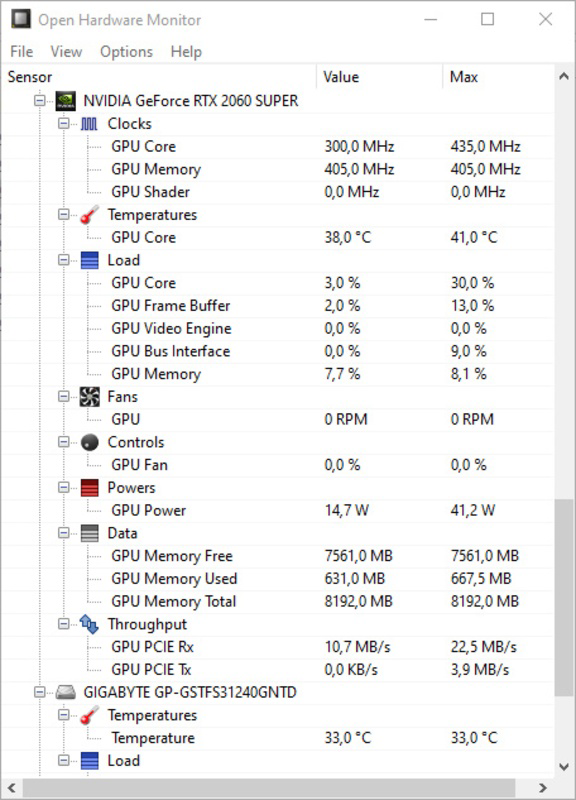
About Open Hardware MonitorOpen Hardware Monitor is a free, open-source program designed to help users monitor their computer's temperature, fan speeds, CPU clock frequency, and voltages. With its simple interface and easy-to-use features, Open Hardware Monitor provides valuable real-time information about your PC's performance. Key Feature 1: Monitor Temperature Sensors One of the main functions of Open Hardware Monitor is to monitor the temperature of your computer's sensors. This feature allows users to keep track of their system's temperature, ensuring that it remains within safe operating limits and preventing potential overheating issues. 2: Fan Speeds and CPU Clock Frequency Monitoring In addition to temperature monitoring, Open Hardware Monitor also enables users to monitor their computer's fan speeds and CPU clock frequency. This information is crucial for maintaining optimal system performance and ensuring that your computer is running efficiently. 3: Voltage Monitoring Open Hardware Monitor provides users with the ability to monitor their system's voltages. This feature helps users maintain the stability and reliability of their computer, as irregular voltages can lead to system crashes or hardware damage. 4: Easy Setup and Configuration One of the advantages of Open Hardware Monitor is its ease of setup and configuration. Users do not need to install the program to use it; they simply need to activate an option to set it up to start with Windows. The options tab allows users to change units for measuring temperature or the registration interval of sensors. Additionally, users can easily edit component names by right-clicking on them. 5: Real-Time Information Thanks to Open Hardware Monitor, users can access real-time information about their computer's performance, including temperature, fan speeds, CPU clock frequency, and voltages. This valuable information helps users maintain their system's performance and troubleshoot potential issues before they escalate. In conclusion, Open Hardware Monitor is a highly useful and easy-to-use program that provides users with comprehensive real-time information about their computer's performance. Its ability to monitor temperature, fan speeds, CPU clock frequency, and voltages makes it an essential tool for maintaining optimal system performance and ensuring the stability and reliability of your PC.Reviewed by Eddie C. ReardonShow MoreShow Less

Guides & Tutorials for Open Hardware Monitor

How to install Open Hardware Monitor
  1. Click the Preview / Download button above.
  2. Once redirected, accept the terms and click Install.
  3. Wait for the Open Hardware Monitor download to finish on your device.
How to use Open Hardware Monitor

This software is primarily used for its core features described above. Open the app after installation to explore its capabilities.

User Reviews for Open Hardware Monitor 0

    No reviews found

Similar Apps
